Currency Strength Meter
- 3.5
- Rating
- 10.00K
- Installs
- Free
- Price
 Analysis by App-foxy
I found Currency Strength Meter most useful as a quick visual aid rather than a complete trading platform. It is a finance app from shubhlaxmi that helps me compare the relative strength of currency pairs across different timeframes. That sounds narrow, and it is, but the narrow focus is also the reason I can open it during a short break and get a clearer market overview without first sorting through a large collection of charts and tools.
The important distinction is that this is a currency-analysis companion, not a replacement for a broker, exchange, portfolio tracker, or full technical-analysis suite. I would use it to form an initial view of which currencies appear stronger or weaker, then move to another service if I needed order execution, detailed chart drawing, news, alerts, or account management. For a reader who wants a compact way to inspect relative currency momentum, it has a sensible purpose. For someone expecting a complete foreign-exchange workstation, its limited scope becomes noticeable quickly.
How the strength view fits into everyday use
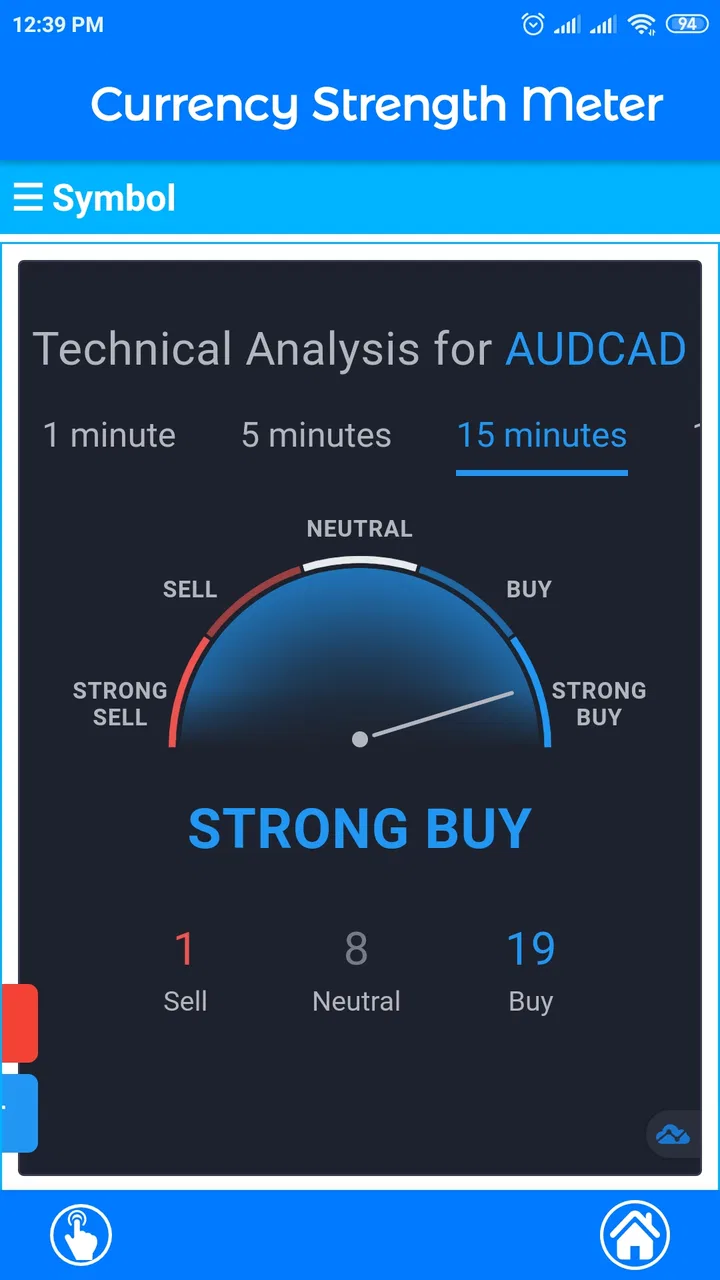
The central idea is simple: instead of examining one pair in isolation, I can look at currency strength through several timeframes and use that comparison to narrow my attention. This is more practical than it may sound. A pair can look interesting on a short view while behaving very differently over a broader period, so checking more than one timeframe helps me avoid treating a single snapshot as the whole market story.
You May Also Like

 Blood Strike: 2.5 Anniversary
Blood Strike’s Loadouts Turn Every Drop Into a Tactical Gamble
A close look at Blood Strike’s custom loadouts: how fast access to signature weapons reshapes its battle royale rhythm, rewards preparation, and narrows the gap between fights.

 Pandora - Music & Podcasts
Pandora’s Music Is Easy to Start, but Harder to Recover
Pandora’s strength is its low-effort path from a seed to a station. Its weak spot is how much confidence it asks you to place in connection, setup, and quiet recovery.

 8 Ball Pool
 Is Built on Rivalries, Rematches, and Routine
A close look at the rivalries, rematches, shared routines, and unanswered safety questions that turn a quick pool match into a persistent mobile community.

 Samsung Music
’s Quiet Strength Is Playing What You Already Own
Its reach comes less from spectacle than from dependable access to a personal library. That simplicity is both the app’s strongest retention engine and its ceiling.

 AccuWeather: Weather Radar
AccuWeather Review: A Quick, Clear Forecast for Everyday Decisions
For everyday plans, the best forecast is the one you can understand quickly. AccuWeather makes rain timing, radar, and local conditions easy to act on, with a few trade-offs.

 Hill Climb Racing
Why Hill Climb Racing Still Turns Crashes Into One More Run
A tiny car, a bumpy hill and one more upgrade: Hill Climb Racing keeps resurfacing because its simple chaos makes every near-miss feel personal.
More From Our News Desk
View All News


My preferred workflow is to begin with the broadest view that feels relevant, identify currencies that stand out, and then move toward a shorter timeframe only if the picture remains coherent. I do not treat a strength reading as a buy or sell instruction. I use it as a screening step: it tells me where to investigate, not what decision to make. That habit is especially important because a strength meter can simplify a complicated market into an attractive ranking, while the reasons behind that ranking may still require charts, economic context, and risk planning elsewhere.
One of the less obvious benefits is the way the app can change the question I ask. Instead of opening a familiar pair out of habit, I can first ask which currencies are showing the clearest contrast. That can reduce tunnel vision. It is a useful approach for people who repeatedly watch the same major pairs and want a fast prompt to consider alternatives without building a complicated watchlist from scratch.
There is also a trade-off. The simpler the display, the easier it is to scan, but the less explanation I have for the result. I would not rely on a displayed strength relationship without checking the underlying price action in a more detailed tool. A strong currency can remain strong for different reasons, and a short-lived move can look persuasive if I only inspect one timeframe. The app works best when I keep that limitation in mind.
Why several timeframes matter more than a single reading
When I compare timeframes, I am looking for agreement and disagreement. Agreement can make a currency worth further research, while disagreement can be a warning that the market is shifting or that the apparent strength is limited to a shorter move. This is one of the most useful ways to get more from the app than simply glancing at whichever value appears most prominent.
A realistic example would be checking the app before work because I am considering whether to study a currency pair later in the day. If the broader view favors one currency but the shorter view favors its counterpart, I would not force a trade idea from that conflict. I would mark the pair as unsettled and wait for a clearer setup in my charting app. If several views point in the same direction, I still would not enter automatically, but I would know where to spend my limited research time.
This makes Currency Strength Meter particularly suitable for a quick morning scan, a short review between tasks, or a second opinion while I am already studying a market elsewhere. It is less suitable for someone who needs a detailed explanation of every move. The app gives me a comparative lens; it does not remove the need for interpretation.
Connectivity changes the quality of a quick check
Because the app deals with changing currency information, connectivity is part of the experience even when the interface itself feels lightweight. A strong connection makes the quick-check workflow feel natural: I open the app, inspect the available timeframe views, and decide whether a pair deserves more attention. On a weak or inconsistent connection, that same routine becomes less dependable because I have to think about whether the information I am seeing is current enough for the decision I have in mind.
I would be careful not to treat a screen that loads successfully as proof that every reading is suitable for immediate action. For a casual educational comparison, a brief delay may not matter. For a time-sensitive trading decision, it matters much more. My practical rule is to use the meter for orientation, then verify any important idea in a service that gives me the current chart and execution context I need.
This is also why I would avoid opening it for the first time in the middle of a rushed decision. The better routine is to check the app before the pressure arrives, understand what the readings are showing, and then use it as one input among several. That reduces the temptation to interpret a single changing display as certainty.
Network conditions matter in another way: repeated refreshing can become a distraction. If I keep checking the same screen because I am waiting for a clearer result, I may end up reacting to noise rather than improving my analysis. A disciplined check at planned moments is more useful than constant reopening. The app encourages quick observation, but the user still has to supply the patience.
Using it comfortably on a phone
Currency Strength Meter makes the most sense on a phone because its purpose is quick access. I can imagine using it while commuting, waiting for an appointment, or taking a short break when I do not have room for a full desktop setup. Those situations favor a focused tool over a platform crowded with indicators, account panels, and multiple chart windows.
At the same time, mobile convenience should not be confused with mobile suitability for every task. A phone is fine for comparing strength and deciding what to investigate next. It is less comfortable for building a complete trading plan, comparing several detailed charts, reading market news alongside technical levels, or checking an order carefully. I would use the app to reduce the search area, then switch to a larger or more specialized environment when the decision becomes consequential.
One useful mobile habit is to separate observation from action. I can check the meter while away from my desk, note which currency relationships deserve attention, and postpone any serious decision until I can verify the idea properly. That turns the phone into a research prompt instead of an impulse machine. For beginners, this separation is valuable because it prevents a compact screen from encouraging oversized conclusions.
The app’s free availability also lowers the barrier to trying this workflow. It is listed for Everyone and runs on Android seven or newer, so it is aimed at a broad range of phone users rather than only people with recent hardware. The current version is 1.4.0. I would still judge the experience on my own device, especially if I depend on it during travel or use an older phone where switching between the meter and a charting service may feel slower.
What happens when a check goes wrong
My biggest concern with a connectivity-sensitive finance tool is not that a single check might take longer; it is that a user could mistake an incomplete or delayed view for a reliable market signal. If the screen does not refresh as expected, I would not keep interpreting the existing display as if nothing had changed. I would close the loop by checking the same currency relationship in another current source before acting.
A sensible recovery routine is straightforward. First, stop treating the visible reading as decisive. Next, retry when the connection is stable. Then compare the result with a separate chart or market source. If the readings disagree, I would regard that disagreement as a reason to pause, not as an invitation to choose the more convenient answer. This is a practical safeguard for any app that deals with information that can change while I am looking at it.
I also recommend keeping notes about the context of a check rather than relying on memory. If I record the timeframe I examined and the pair that caught my attention, I can later see whether the idea held up in a detailed chart. That turns the app into a learning tool. Over time, I can discover whether I am consistently misreading short-term strength, overlooking reversals, or giving too much weight to a single timeframe.
Another useful recovery principle is not to over-refresh. If the display is unclear, repeated taps rarely improve the quality of the decision. A short pause, a fresh check, and independent confirmation are more valuable than trying to force certainty from one screen. This may sound basic, but it is exactly the kind of behavior that separates a helpful market shortcut from a source of unnecessary anxiety.
Keeping the app sensible for data-conscious users
I would not describe Currency Strength Meter as a heavy finance workstation, and that light focus is appealing when I want a quick comparison rather than a long session. Still, data-conscious use depends less on how simple the app looks and more on how deliberately I open it. If I am checking the same information repeatedly without changing my decision, I am spending attention and connectivity for little benefit.
For routine use, I would choose a few specific moments: a planned market review, a confirmation before deeper research, and perhaps a later comparison to see whether the earlier relationship changed. I would avoid making it a constant background habit. This approach keeps the app aligned with its strongest role, which is rapid orientation across timeframes.
The free download makes experimentation easy, but the app includes in-app purchases ranging from $1.99 to $15.99 per item. I would not spend money simply because I wanted a more serious trading workflow. First I would use the free experience long enough to decide whether the strength comparison genuinely improves my process. If it does not change what I research or how I organize my analysis, paying for extras would not solve the underlying mismatch.
That is an important distinction for newcomers. A paid option inside a currency tool does not automatically provide better judgment, fresher insight, or lower risk. The value depends on whether the app’s particular view fits the user’s method. Someone who already has a robust charting platform may find the meter useful as a compact supplement, while someone looking for education, explanations, and guided decisions may be better served by a learning-focused finance app.
Who will get the most from this focused tool?
I think it is a good match for a beginner who wants to understand relative currency behavior without immediately confronting a complex trading terminal. It can also suit an intermediate user who already knows how to read charts and wants a fast way to shortlist pairs. The app’s average rating is 3.5 from around 131 ratings, with five written reviews, and its install count is over 10,000. Those figures suggest a modest user base rather than a universally established finance platform, so I would approach it as a focused utility and judge it by my own workflow.
I would skip it if my main requirement is execution, advanced charting, economic calendars, broker integration, portfolio management, or detailed alerts. Those needs belong to broader tools. I would also skip it if I tend to turn every visual ranking into an immediate trade. A strength meter can be useful only when I understand what it is measuring and what it leaves out.
Compared with a typical broker app, this tool is narrower but potentially quicker for one specific question: which currency relationships deserve a closer look? Compared with a full charting platform, it is less informative but easier to scan. Compared with manually comparing many pairs, it can save time, provided I remember that speed comes from reducing detail. The right alternative depends on whether I value breadth, execution, education, or rapid screening.
For me, the strongest use case is a two-stage workflow. I start here to identify a possible contrast, then move to a more complete source to check trend structure, timing, and risk. I would not reverse that order when I am short on time, because beginning with a familiar pair can make me overlook a more interesting relationship elsewhere.
My connectivity verdict
Currency Strength Meter is a sensible, specialized finance app for quick currency comparison across timeframes. Its usefulness comes from focus: I can use it to scan relative strength, challenge my usual pair choices, and decide where deeper analysis should happen next. The mobile format supports short research sessions, while the free entry point makes it easy to test without committing to a larger platform.
Its limitations are equally clear. It is not the place where I would expect a complete trading process, and network conditions should make me cautious about treating a displayed reading as an immediate instruction. I would verify important observations elsewhere, avoid over-refreshing, and use the app as a screening layer rather than a final authority.
My recommendation is conditional but positive: try it if you want a compact currency-strength view and already understand that comparison is only the beginning of analysis. If you need execution, deep charts, or extensive market context in one place, choose a broader finance app instead. Used with that boundary, this small tool can make mobile market research faster without pretending to replace the rest of the job.
FAQs for Currency Strength Meter
01What is Currency Strength Meter and how does it work?
Currency Strength Meter is a financial analysis app designed to compare the relative strength of major currencies. It typically evaluates price movements across multiple currency pairs and presents the results in an easy-to-read ranking, chart, or meter. This can help traders identify stronger and weaker currencies before researching possible forex opportunities, although the readings should be treated as analysis rather than guaranteed trading signals.
02Which currencies and markets can I monitor with Currency Strength Meter?
The app generally focuses on widely traded forex currencies such as the US dollar, euro, British pound, Japanese yen, Swiss franc, Canadian dollar, Australian dollar, and New Zealand dollar. Depending on the version and available data provider, coverage may vary, and some features may be limited by market hours or subscription level. Check the app’s current listing for the exact supported currencies and instruments.
03Is Currency Strength Meter suitable for beginners?
Beginners can use Currency Strength Meter as an introduction to comparing currency performance, but the app does not replace basic forex education. Understanding exchange rates, spreads, volatility, economic news, and risk management is still important. The strength rankings may look simple, yet they require context because a currency can appear strong temporarily or react sharply to news shortly after the reading is displayed.
04Does Currency Strength Meter provide accurate real-time information?
The usefulness and timing of the information depend on the data source, update frequency, internet connection, and the app’s selected timeframe. Some versions may offer real-time or near-real-time readings, while others can include delayed data or require a premium plan for faster updates. Before acting on any result, compare the displayed information with a reliable broker or market-data platform.
05Can I use Currency Strength Meter to make trading decisions?
You can use the app as one part of a broader forex research process, especially when screening for currency pairs with a noticeable strength difference. However, it should not be used as an automatic buy or sell system. Confirm its readings with technical analysis, economic calendars, price action, and appropriate risk controls. Forex trading involves substantial risk, and past strength patterns do not guarantee future results.
Pros
- Quickly compares the relative strength of multiple currencies
- Useful for spotting potential trend changes and market momentum
- Clean interface makes key currency data easy to scan
- Supports faster forex analysis without manually calculating strength
- Helpful for beginners learning how currencies perform against each other
Cons
- Strength readings may differ from your broker’s live market data
- Some features or currency pairs may require a paid upgrade
- Not a standalone trading signal or guarantee of profitable decisions
- Requires an internet connection for current currency information
- Limited value for users who only need basic exchange-rate conversions

Currency Strength Meter
Gallery